

1. What Is SSL?
SSL (Secure Sockets Layer) is a security protocol that encrypts data transferred between a user’s browser and a web server. This encryption ensures that sensitive information, such as passwords, credit card details, and personal data, remains protected from cyber threats like hacking and identity theft.
Websites with SSL have HTTPS (Hypertext Transfer Protocol Secure) instead of HTTP in their URLs. SSL is now a mandatory standard for securing websites, with most browsers flagging non-SSL sites as "Not Secure."
2. How Does SSL Work?
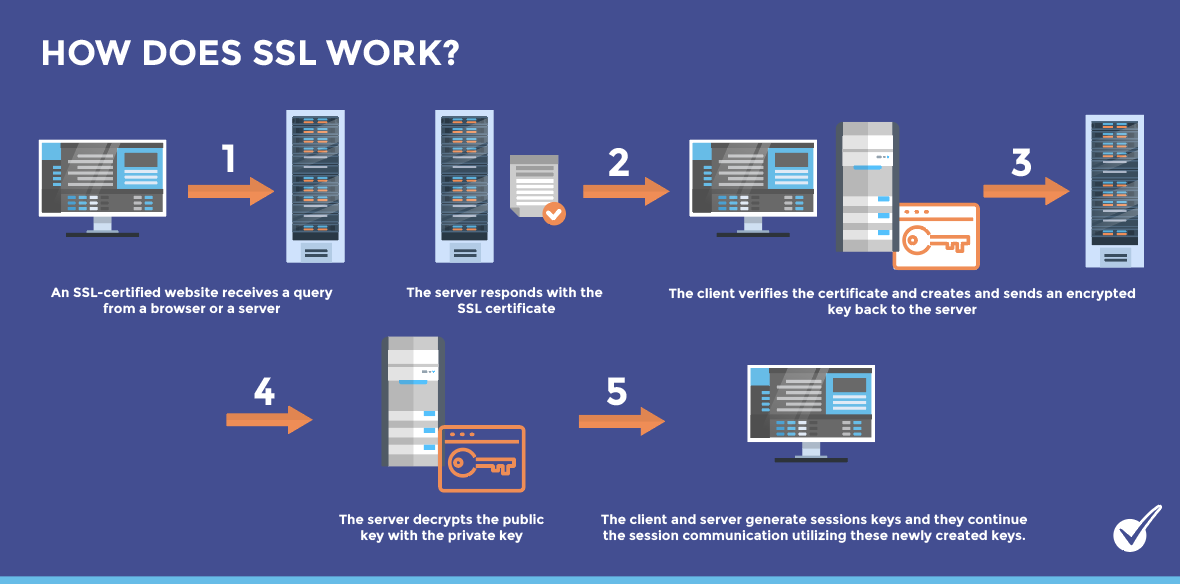
SSL works by establishing an encrypted connection between a web server and a user’s browser using a cryptographic process.
Key Steps in SSL Encryption
- Handshake Process: When a user visits an HTTPS website, their browser requests an SSL certificate from the server.
- Authentication: The server provides a digital certificate issued by a trusted Certificate Authority (CA) to verify its legitimacy.
- Encryption Key Exchange: Both the browser and server generate and exchange encryption keys to establish a secure connection.
- Secure Data Transfer: Once the connection is established, all data is encrypted, ensuring protection from eavesdropping and cyberattacks.
3. Types of SSL Certificates
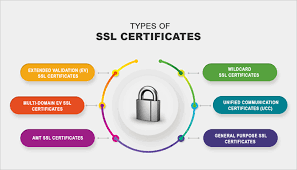
Different types of SSL certificates cater to various security needs.
1. Domain Validated (DV) SSL
- Validation Level: Basic
- Best for: Small websites, blogs, and personal sites
- Details: Confirms domain ownership but does not verify business identity.
2. Organization Validated (OV) SSL
- Validation Level: Moderate
- Best for: Business and company websites
- Details: Requires business verification to ensure legitimacy.
3. Extended Validation (EV) SSL
- Validation Level: High
- Best for: E-commerce sites, financial institutions, and enterprises
- Details: Provides the highest level of authentication, increasing user trust.
4. Wildcard SSL
- Best for: Websites with multiple subdomains
- Details: Covers the main domain and all subdomains under a single certificate.
5. Multi-Domain SSL (SAN SSL)
- Best for: Businesses managing multiple websites
- Details: Allows securing multiple domains with one certificate.
4. Benefits of Using SSL on Your Website
Implementing an SSL certificate offers several advantages:
✅ Data Encryption – Protects sensitive data from hackers and cyber threats.
✅ Boosts SEO Rankings – Google favors HTTPS websites in search rankings.
✅ Increases User Trust – Visitors trust secure websites, reducing bounce rates.
✅ Enables Secure Online Payments – Required for PCI compliance in e-commerce.
✅ Prevents "Not Secure" Warnings – Browsers flag non-HTTPS sites, discouraging visitors.
SSL is no longer optional; it is a critical security feature for all websites.
5. How to Install an SSL Certificate
Installing an SSL certificate depends on your hosting provider and certificate type.
1. Obtain an SSL Certificate
- Purchase from a trusted Certificate Authority (CA) like Let’s Encrypt, DigiCert, or GlobalSign.
- Some hosting providers offer free SSL certificates with hosting plans.
2. Install the SSL Certificate
- If using cPanel, go to the SSL/TLS section and upload the certificate.
- If using Managed Hosting, enable SSL from the hosting dashboard.
- Manually configure SSL for advanced setups.
3. Configure HTTPS Redirects
- Update website settings to force HTTPS.
- Modify the .htaccess file or use plugins like Really Simple SSL for WordPress.
4. Test SSL Installation
- Use SSL verification tools like SSL Labs to check installation success.
6. Common SSL Errors and How to Fix Them
Even with proper installation, SSL errors can occur. Here’s how to troubleshoot them.
1. SSL Certificate Not Trusted
🔹 Cause: The certificate is issued by an untrusted CA.
✅ Fix: Purchase from a recognized provider like Sectigo, DigiCert, or Let’s Encrypt.
2. Mixed Content Warning
🔹 Cause: Some elements (images, scripts) load over HTTP instead of HTTPS.
✅ Fix: Use the "Really Simple SSL" plugin for WordPress or update URLs manually.
3. Expired SSL Certificate
🔹 Cause: SSL certificate has expired.
✅ Fix: Renew SSL before expiration and set up auto-renewal if possible.
4. Redirect Loop (ERR_TOO_MANY_REDIRECTS)
🔹 Cause: Incorrect HTTPS redirection settings.
✅ Fix: Update .htaccess rules and avoid multiple redirection configurations.
5. Incorrect SSL Configuration
🔹 Cause: SSL is not installed correctly.
✅ Fix: Reinstall SSL via cPanel or hosting settings.





Comments 0
Sign in to join the conversation.
No comments yet. Be the first to say something.