
Article.Pk - Write, Earn, and Be Heard

Unlocking Node.js Potential: A Guide to Setting Up Applications on Shared Hosting Environments

Setting up a Node.js application on shared hosting can be a daunting task, but this guide offers a comprehensive walkthrough. From accessing your hosting control panel to configuring Node.js, managing...

Unlocking Node.js Potential: A Guide to Setting Up Applications on Shared Hosting Environments

Node.js Selector plugin

Note:

Node.js Selector icon in the end user interface when Node.js is disabled.

Close-up of tower servers in a data center with blue and red lighting.

End User interface allows end users to set up and manage Node.js for their web applications.
Go to cPanel → Software Section → Setup Node.js App.

Web Applications page is displayed.

Sleek laptop showcasing data analytics and graphs on the screen in a bright room.

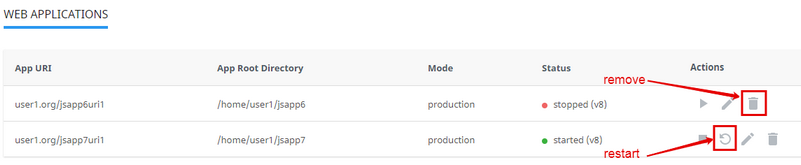
There are several columns in the list.

  • App URI — application URI including the domain.
  • App Root Directory — application root directory relative to user's home.
  • Mode — can be production or development.
  • Status — started/stopped — displays if an application is running or not and version of application.
  • Actions — allows to start, restart, stop, edit, and remove a particular application.

How to manage the application

Start application

To start a stopped application do the following:

  • Click Start icon in the Actions column in a stopped application row.
  • When an action is completed a Start icon changes to Stop icon.

Stop application

To stop a started application do the following:

  • Click the Stop icon in the Actions column in a started application row.
  • When an action is completed a Stop icon changes to Start icon.

Hands typing on a laptop keyboard in an indoor setting. Perfect for business and technology themes.

Restart application

To restart started application do the following:

  • Click the Restart icon in the Actions column in a started application row. A current row is blocked and will be unblocked when a process is completed.

Remove application

To remove application do the following:

  • Click Bin icon in the Actions column in a particular application row.
  • In the confirmation pop-up click Agree to start removing or Cancel to close the pop-up.
  • When an action is completed an application will be removed from the Web Applications table and a confirmation pop-up will be displayed.
Edit application

To edit application do the following:

  • Click Pencil icon in the Actions column in a particular application row. A particular application tab opens.
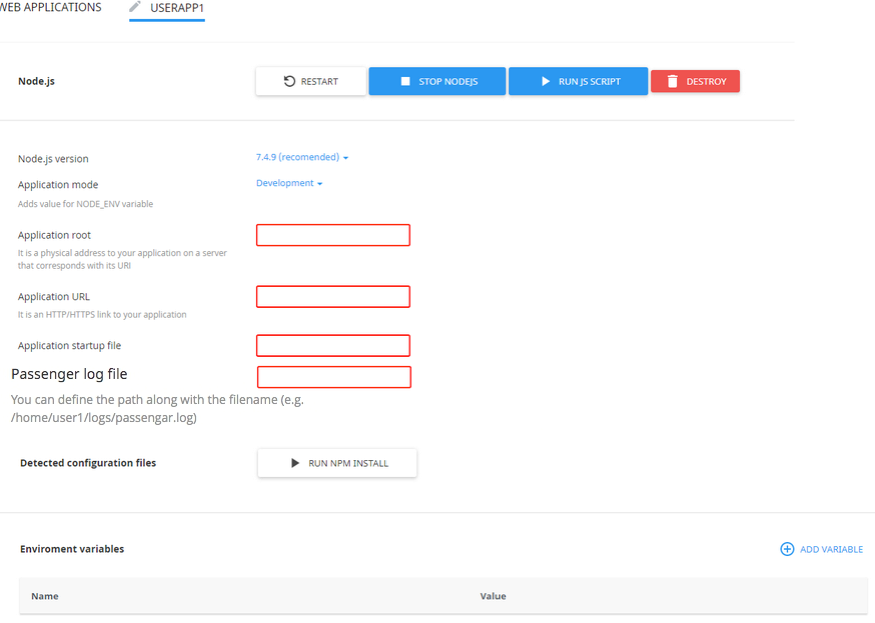
The following actions are available:

  • Restart application — click Restart button.
  • Stop Node.js — click Stop Node.js button.
  • Run JavaScript script — click Run JS Script button to run a command specified in the Scripts section of the package.json file. Specify the name of the script to run plus any parameters then click Ok .
  • Remove application — click the Delete button and confirm the action in a pop-up.
  • Change Node.js version — choose Node.js version from a drop-down.
  • Change Application mode — choose application mode from a drop-down. Available modes are Production and Development.
  • Application root — specify in a field a physical address to the application on a server that corresponds with its URI.
  • Application URL — specify in a field an HTTP/HTTPS link to the application.
  • Application startup file — specify as NAME.js file.
  • Passenger log file — starting from CloudLinux Manager 5.1.0-2 you can set paths to Passenger logs for Node.js applications via UI (or using cloudlinux-selector utility).
  • Run npm install command — click the Run npm install button to install the package(s) described in the package.json file.
  • Add Environment variables — click Add Variable and specify a name and a value.

Note: 

You can also use Node.js Selector CLI.

 

AR
Written by
@abdulrehman · 35 articles · Joined Aug 2022

Hi! This is Abdul Rehman. I am a 22-year-old content writer. I am a very passionate and responsible writer. I like to write on biological terms mostly. I also write content on various websites, such as http://www.mtlogis...

Comments 0

Sign in to join the conversation.

No comments yet. Be the first to say something.

Keep reading

2 Best Apps For Watching Korean DramasEntertainment31.1kviews4paid views

2 Best Apps For Watching Korean Dramas

Creating an account on HiTv and Hulu for Korean dramas is a simple and straightforward process. By following the steps outlined in this article, you'll be able to create an...

HTHajra Tareen
  • 31.1kviews
  • 4paid views
  • 9 May 2023published
How To Create  And Use A Paytm AccountTech34.5kviews11paid views

How To Create And Use A Paytm Account

Paytm is a popular Indian digital payments and e-commerce platform that offers a range of services such as mobile recharges, bill payments, movie tickets, flight bookings, and more. If you're...

HTHajra Tareen
  • 34.5kviews
  • 11paid views
  • 9 May 2023published
Latest Mehndi Design Trends for Weddings and FestivalsTech12.1kviews

Latest Mehndi Design Trends for Weddings and Festivals

Mehndi design is a beautiful tradition in South Asia. Discover popular bridal, simple, and modern mehndi designs used in weddings and festive celebrations.

UUUsman Ullah
  • 12.1kviews
  • 19 Mar 2026published
How To Use Jazz Cash And The Easy Paisa AppTech17kviews12paid views

How To Use Jazz Cash And The Easy Paisa App

In Pakistan, JazzCash and EasyPaisa are two of the most popular mobile payment solutions. These apps provide users with a wide range of services, including bill payments, money transfers, mobile...

HTHajra Tareen
  • 17kviews
  • 12paid views
  • 9 May 2023published
Laptop Price in Pakistan 2026: Complete Buying Guide for Every BudgetTech6kviews23paid views

Laptop Price in Pakistan 2026: Complete Buying Guide for Every Budget

Complete guide to laptop prices in Pakistan covering budget, mid-range, high-performance, and premium laptops from HP, Lenovo, Dell, ASUS, and Apple MacBook. Includes prices by brand, best laptops for students...

ZMZeeshan Mudassir Hussain
  • 6kviews
  • 23paid views
  • 5comments
  • 13 minminute read
  • 23 Feb 2026published
Writing Articles and Earning Money in Pakistan: A Lucrative Opportunity on Article.pkEntrepreneurship & Startups7kviews50paid views

Writing Articles and Earning Money in Pakistan: A Lucrative Opportunity on Article.pk

Writing articles and earning money in Pakistan is a lucrative opportunity available on Article.pk. Explore the platform's features, learn essential tips for success, and discover effective strategies to optimize your...

ZMZeeshan Mudassir Hussain
  • 7kviews
  • 50paid views
  • 5 Sept 2021published